Tuesday, March 14, 2023

kubernetes kubectl alias

alias k='kubectl'

alias kg='kubectl get'

alias kd='kubectl describe'

alias kdp='kubectl describe pod'

alias kgnd='kubectl get no'

alias kgp='kubectl get po'

alias kgpa='kubectl get po -A'

alias kaf='kubectl apply -f '

alias kctxdev='kubectl config use-context k8s-dev-cluster-context'

alias kctxprod='kubectl config use-context k8s-prod-cluster-context'

Thursday, March 16, 2017

Oracle OIM Server and Design Console


OIM Server and Design consoles:


ConsolesAccess URLs
Checking the Oracle Identity Manager Server Web Console URL http://<host>:14000/oim
Checking the Oracle Identity Manager Server Scheduler Engine URL http://<host>:14000/SchedulerService-web
Checking the OIM Diagnostic Dashboard utility URL http://v:14000/XIMDD
Checking the OIM Weblogic Admin Console URL http://<host>:7001/console
Checking the OIM EM console URL http://<host>:7001/em
Checking the SOA Infrastructure URL http://<host>:8001/soa-infra/
Checking the BPEL Worklist application URL http://<host>:8001/integration/worklistapp

Thursday, January 26, 2017

Apache Storm - Custom Bolt

Apache Storm is open source distributed computing system. Storm can be used for - Streaming  Data, Realtime Data Processing and Distributed Messaging ...

In one of my assignment am using Storm for streaming data (one of Storm main feature). Requirement was to stream CDR (Call Data Records) file data to HDFS. As calls originate from different regions, data records has to go to directory in HDFS corresponding to region of call origination.
eg: consider a call records from Karnataka (KA) will be written to directory: <PARETN_DIR>/state=NAME in HDFS.

Later i can define a hive table with state as partition fetch desired records.

To achieve data streaming to specific directory based on record content i chose to create a custom CDRHDFSBolt by extending HDFSBolt API provided by Storm. Except for writeTuple() method i kept all method untouched. I over wrote writeTuple() method to verify tuple content: if it has a value corresponding to desire state, then write tuple to HDFS else discard the tuple.

Bolt Class:
public class CDRHDFSBolt extends HdfsBolt{

    @Override
    public void writeTuple(Tuple tuple) throws IOException{      
        String record = tuple.getString(0);
        String statename = tuple.getString(1);
     
        if(statename.equals("NAME"))
            super.writeTuple(tuple);
     
        this.collector.ack(tuple);
    }
}

Topology Class:


     HdfsBolt bolt = CDRHdfsBolt();
     FileNameFormat fileNameFormat = new DefaultFileNameFormat()
            .withPath("/prac/storm/callrcds/statename=NAME")
            .withExtension(".txt");
     bolt.withFileNameFormat(fileNameFormat);

Note: set HDFS details to bolt.


Wednesday, December 28, 2016

Spark - RDD


First - RDD stands for Resilient Distributed Dataset.

Spark RDD is a distributed collection of data. This distributed collection is usually created in two ways: by external data ( a file, data from HDFS) or by distributing a collection of object ( eg: List/Set) in driver program.

Scala code to create RDD:

  1. External data RDD: val lines = sc.textFile("input.txt") 
  2. Distribute Collection RDD: val nums = sc.parallelize(List(1, 2, 3, 4))
*sc - is SparkContext object 

Now we have RDDs created in our driver program. Once RDD created, we do computation on theses.
Two ways of computation can be performed on RDD:

  • Transformation: Transformation results in new RDDs. Commonly used Transformations:
    • flatMap(): apply function to each element in RDD and returns cotent of iterator returned as new RDD.
    • filter(): returns an RDD that contains only elements that pass filter condition
    • map():  returns an RDD applying function to each element in RDD 
    • distinct(): removes duplicate elements.
    • Union: produces an RDD with contianning elements from both ...
  • Actions: Actions are the operations that return some value or write data. Commonly used Actions:
    • collect(): returns all elements in RDD
    • count(): Number of elements in RDD
    • foreach(): iterate over the elements in RDD 
    • top(num): returns top num elements from RDD ... 

Scala - Scala Build Tool (SBT)


Couple of weeks back i started with Spark, which requires Scala and SBT (a build tool for Scala). I downloaded Scala 2.12.1 and SBT 0.13. While creating assembly jar (package) for SimpleWordCount scala project using SBT i hit an issue. The error message was not clear enough to figure out solution. Later through documentation i got to know SBT 0.13 does not support Sacla 2.12.1 I had to go back and download Scala 2.10.6. Now packaging of SimpleWordCount was fine.

Before getting SBT, check supported vresions of Scala.

Tuesday, July 31, 2012

Primavera P6-BPM Configuration

P6-BPM Configuration


Steps to integrate Primavera P6 with BPM Server:

  •  Login to P6 admin console:-  http://<host>:<port>/p6/action/adminconfig
  • Under configurations tab, expand ‘Custom’ tree.
  • Go to ‘Primavera P6 Configuration’ -> ‘Database’ -> ‘Insatnce[2]: Standard DB’ -> ‘BPM Settings’.
Configuration Screen

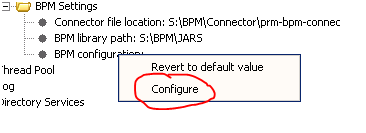
  • Under ‘BPM Settings’, Right-Click on BPM Configuration and Select Configure
BPM Settings

  • In BPM options table, provide details about BPM Server.

BPM Options
·      
  • After changes, you will need to click OK here and Save on the previous screen.
  • Restart the P6 Server.


Monday, July 30, 2012

Web Service Security Policy

This blog explains about accessing Web Services secured with 'Useraname Token' policy:


‘Username Token’ is a WS security policy in which authentication information (user name and password) for accessing services, will be part of request xml header.

Corresponding Oracle WS Security policy is: 'oracle/wss_username_token_client_policy'

Java code to add information to request xml header:

 SecurityPoliciesFeature securityFeatures = new SecurityPoliciesFeature(new String[] { "oracle/wss_username_token_client_policy" });
 ProjectPortType projectPortType = projectService.getProjectPort(securityFeatures);
 Map<String, Object> reqContext = ((BindingProvider)projectPortType).getRequestContext();
 reqContext.put(BindingProvider.USERNAME_PROPERTY, "username");
 reqContext.put(BindingProvider.PASSWORD_PROPERTY, "password");

Friday, March 16, 2012

Unzip Multipart Archive in Linux

The post takes you through steps to unzip a multipart archive in Linux.
Steps:
• Download binary file to install 7zip in linux:
url: http://sourceforge.net/projects/p7zip/files/p7zip/9.20.1/
file: p7zip_9.20.1_x86_linux_bin.tar.bz2

• Install 7zip.
Command to install 7zip: tar xvjf p7zip_9.20.1_x86_linux_bin.tar.bz2
Note: By default it will be installed in /usr/local/bin

• Run the command to unzip multipart archive.
Go to the location where you have multipart archive file and run following command.
$ /usr/locale/bin/7za x .zip.001

Command to create a multi-part archive:
Go to folder which you want to archive and run the following command.
$ /usr/local/bin/7z a <archive-name.7z> <folder_name> -v1024m

or

$ /usr/local/bin/7za a -v700m destination_file source_file

Monday, July 25, 2011

Large WAR file deployment in Tomcat 7

Tomcat 7 Manager application complains while deploying a larger WAR file. Here is error message:

The server encountered an internal error () that prevented it from fulfilling this request.

Exception java.lang.IllegalStateException: org.apache.tomcat.util.http.fileupload.FileUploadBase$SizeLimitExceededException:
the request was rejected because its size (XXX) exceeds the configured maximum (52428800)

Here is a solution:
Go to the web.xml of the manager application (@: TOMCAT_HOME/webapps/manager/WEB-INF/web.xml)
Increase the max-file-size and max-request-size:
Set these values greater than your WAR file size.


52428800
52428800
0

Wednesday, March 9, 2011

File Upload with Servlet 3.0

Servlet 3.0 has come with bunch of exciting features. File upload is one among the new feature available in servlet 3.0.

In earlier versions of servlet, file upload required commons api. In version 3.0 this feature is embedded in servlet api itself.

Here is a example to brief on file upload in servlet 3.0

FileUploadServlet is a servlet which extends HttpServlet and overrides doPost() method. To use file upload feature of servlet 3.0,
• MultipartConfig annotation has to specified on servlet, indicating that instance of the servlet expect request that conform to the multipart/form-data MIME type.

• Request object is provided with an API request.part(fileName), to get part or form item that was received within a multipart/form-data post request.


package com.jb;

import java.io.BufferedReader;
import java.io.BufferedWriter;
import java.io.FileWriter;
import java.io.IOException;
import java.io.InputStream;
import java.io.InputStreamReader;
import java.io.PrintWriter;
import javax.servlet.ServletException;
import javax.servlet.annotation.MultipartConfig;
import javax.servlet.annotation.WebServlet;
import javax.servlet.http.HttpServlet;
import javax.servlet.http.HttpServletRequest;
import javax.servlet.http.HttpServletResponse;
import javax.servlet.http.Part;

@MultipartConfig
@WebServlet(name="FileUploadServlet", urlPatterns={"/FileUploadServlet"})
public class FileUploadServlet extends HttpServlet {
   
    @Override
    protected void doGet(HttpServletRequest request, HttpServletResponse response)
    throws ServletException, IOException {
        doPost(request, response);
    } 
    
    @Override
    protected void doPost(HttpServletRequest request, HttpServletResponse response)
    throws ServletException, IOException {

        System.out.println("do post of file upload...");
        response.setContentType("text/html;charset=UTF-8");
        PrintWriter out = response.getWriter();
        Part part = request.getPart("fileName");
        InputStream is = part.getInputStream();
        InputStreamReader isr = new InputStreamReader(is);
        BufferedReader br = new BufferedReader(isr);
        FileWriter fw = new FileWriter("c:/temp/tmp.txt");
        BufferedWriter bw = new BufferedWriter(fw);
        String line = null;
        while((line = br.readLine())!=null){
        bw.write(line);
        bw.newLine();
        }
        bw.close();
        br.close();
        out.write("File Uploaded successfully...");
        out.close();
    }
}

A jsp form to upload file to servlet is here.

Monday, March 7, 2011

Hibernate Annotation Many-to-Many

Realizing the relations between entity is a tedious part in hibernate. Here i will explain a Many-to-Many relationship using hibernate annotations with an example.

Lets consider a relation between Product and Category. A product can belong to any number of categories and category can have many products. Hence relation between Product and Category is Many-to-Many.

In the database, Many-to-Many is realized by using an intersection table holding product_id and category_id as foreign keys to corresponding tables.


In hibernate, product and category are considered as entities and product_category_ix is used as joining table to realize Many-to-Many.

Product.java
package com.jb.data;

import java.util.Set;
import javax.persistence.CascadeType;
import javax.persistence.Column;
import javax.persistence.Entity;
import javax.persistence.GeneratedValue;
import javax.persistence.GenerationType;
import javax.persistence.Id;
import javax.persistence.JoinColumn;
import javax.persistence.JoinTable;
import javax.persistence.ManyToMany;
import javax.persistence.Table;

@Entity
@Table(name="product")
public class Product {

    private long id;
    private String name;
    private Set categories;

    
    @Id
    @GeneratedValue(strategy=GenerationType.AUTO)
    @Column(name="product_id")
    public long getId() {
        return id;
    }

    @Column(name="name")
    public String getName() {
        return name;
    }

    public void setId(long id) {
        this.id = id;
    }

    public void setName(String name) {
        this.name = name;
    }

    @ManyToMany(cascade=CascadeType.ALL)
    @JoinTable(name="product_category_ix", joinColumns={@JoinColumn(name="product_id")},
        inverseJoinColumns={@JoinColumn(name="category_id")})
    public Set getCategories() {
        return categories;
    }

    public void setCategories(Set categories) {
        this.categories = categories;
    }
    
}


Category.java
package com.jb.data;

import java.util.Set;
import javax.persistence.CascadeType;
import javax.persistence.Column;
import javax.persistence.Entity;
import javax.persistence.GeneratedValue;
import javax.persistence.GenerationType;
import javax.persistence.Id;
import javax.persistence.JoinColumn;
import javax.persistence.JoinTable;
import javax.persistence.ManyToMany;
import javax.persistence.Table;

@Entity
@Table(name="category")
public class Category {

    private long id;
    private String name;
    private Set products;

    
    @Id
    @GeneratedValue(strategy=GenerationType.AUTO)
    @Column(name="category_id")
    public long getId() {
        return id;
    }

    @Column(name="name")
    public String getName() {
        return name;
    }

    public void setId(long id) {
        this.id = id;
    }

    public void setName(String name) {
        this.name = name;
    }

    @ManyToMany(cascade=CascadeType.ALL)
    @JoinTable(name="product_category_ix",
        joinColumns={@JoinColumn(name="category_id")},
        inverseJoinColumns={@JoinColumn(name="product_id")})
    public Set getProducts() {
        return products;
    }

    public void setProducts(Set products) {
        this.products = products;
    }
    
}


HibernateUtil.java
package com.jb.util;

import com.jb.data.Category;
import com.jb.data.Lead;
import com.jb.data.Product;
import com.jb.data.contactList;
import org.hibernate.Session;
import org.hibernate.SessionFactory;
import org.hibernate.cfg.AnnotationConfiguration;

public class HibernateUtil {

    private static final SessionFactory sessionFactory;
    private static Session session;
    static {
        try {

                AnnotationConfiguration configuration = new AnnotationConfiguration();
                configuration.addAnnotatedClass(contactList.class);
                configuration.addAnnotatedClass(Lead.class);
                configuration.addAnnotatedClass(Product.class);
                configuration.addAnnotatedClass(Category.class);
                configuration.configure();
                                        
                sessionFactory = configuration.buildSessionFactory();

        } catch (Throwable ex) {
                System.err.println("Initial SessionFactory creation failed." + ex);
                throw new ExceptionInInitializerError(ex);
        }
    }

    public static SessionFactory getSessionFactory() {
            return sessionFactory;
    }

    public static Session getSession() {
        session = getSessionFactory().openSession();
        
        return session;
    }


ProductService.java
package com.jb.service;

import com.jb.dao.CategoryDao;
import com.jb.dao.ProductDao;
import com.jb.data.Category;
import com.jb.data.Product;
import java.util.LinkedHashSet;
import java.util.Set;

public class ProductService {

    public List getCategories(){

        List categories = new ArrayList();
        
        Set products = new LinkedHashSet();

        Product epson = new Product();
        epson.setName("EPSON");
        products.add(epson);

        Product hp = new Product();
        hp.setName("HP");
        products.add(hp);

        Category category = new Category();
        category.setName("Laser Printer");
        category.setProducts(products);
        categories.add(category);

        category = new Category();
        category.setName("Ink Jet Printer");
        category.setProducts(products);
        categories.add(category);
        
        return categories;
    }
    
    public static void main(String[] arg){
        System.out.println("processing main...");

        ProductService productService = new ProductService();
        List categories = productService.getCategories();
        CategoryDao categoryDao = new CategoryDao();
        categoryDao.saveCategories(categories);

        System.out.println("Done..!");
    }
} 


CategoryDao.java
package com.jb.dao;

import com.jb.data.Category;
import com.jb.util.HibernateUtil;
import java.util.List;
import org.hibernate.Session;
import org.hibernate.Transaction;

public class CategoryDao {

    public void saveCategory(Category category) {
       System.out.println("save...");
       Session session = HibernateUtil.getSession();
       Transaction transaction = session.beginTransaction();
       session.save(category);
       transaction.commit();
    }

    public void saveCategories(List categories) {

       System.out.println("save...");
       Session session = HibernateUtil.getSession();
       Transaction transaction = session.beginTransaction();
        for (Category category : categories) {
            session.save(category);
        }
       transaction.commit();
    }
}
After running main program, db tables (category, product and product_category_ix) will be updated with new entries.

category:


product:


product_category_ix:


Tuesday, March 1, 2011

Servlet 3.0 (part-2)

This article is continued from Servlet 3.0 (part-1). Here i will try to brief on programmatic adding of Servlet, Filters and Listeners to ServletContext object.

As per Servlet 3.0 Specs, any of these components (servlet, filter or listener) should be added during initialization of servletContext object, contextInitialized(ServletContextEvent sce) method of ServletContextListener API is a better place to add servlet and other components to context object.

A simple example to add a Servlet to ServletContext:

UserHomeServlet is a servlet which has to be registered to context programmatically.

public class UserHomeServlet extends HttpServlet {
   
    /** 
     * Handles the HTTP GET method.
     */
    @Override
    protected void doGet(HttpServletRequest request, HttpServletResponse response)
    throws ServletException, IOException {
        response.setContentType("text/html;charset=UTF-8");
        PrintWriter out = response.getWriter();
        try {
            RequestDispatcher rd = request.getRequestDispatcher("userHome.jsp");
            rd.forward(request, response);
        } finally {
            out.close();
        }
    } 

    /** 
     * Handles the HTTP POST method.
      */
    @Override
    protected void doPost(HttpServletRequest request, HttpServletResponse response)
    throws ServletException, IOException {
        doGet(request, response);
    }
    
}


Implement ServletContextListener to provide realization for contextInitialized() method

@WebListener
public class CustServletContextListener implements ServletContextListener{

    public void contextInitialized(ServletContextEvent sce) {

        System.out.println("init context method");

        try{
            //add UserHomeServlet to context.
            ServletRegistration userHome = sce.getServletContext().addServlet("userHome", UserHomeServlet.class);
            //provide url pattern for UserHomeServlet.
            userHome.addMapping("/userHome");
        }catch(Exception e){
            e.printStackTrace();
        }
        
    }

    public void contextDestroyed(ServletContextEvent sce) {
        throw new UnsupportedOperationException("Not supported yet.");
    }
}


Similarly a Filter and Listener can be registered to context as below:

* Filter
public void contextInitialized(ServletContextEvent sce) {

        try{

            //add UserFilter to Context.
            FilterRegistration userFilter = sce.getServletContext().addFilter("userFilter", UserrequestFilter.class);
            //provide servlet name to filter.
            userFilter.addMappingForServletNames(null, true, "com.jb.UserHomeServlet");

        }catch(Exception e){
            e.printStackTrace();
        }
   }

* Listener

public void contextInitialized(ServletContextEvent sce) {

   try{

            //register UserRequestListener to context.
            sce.getServletContext().addListener(UserRequestListener.class);
            
        }catch(Exception e){
            e.printStackTrace();
        }
        
    }

Thursday, February 17, 2011

MultiActionController in Spring MVC

Under Spring MVC package, i could find an API “MultiActionController”, through which i can forward request to any of the action method in a controller class. Have put a simple code snippet briefing the configuration of MultiActionController.

• Write a java class extending “MultiActionController”.
Extend MultiActionController in SessionController class and group multiple action methods related to session. Eg: login and logout.

package com.jb.web;
 
import javax.servlet.http.HttpServletRequest;
import javax.servlet.http.HttpServletResponse;
 
import org.springframework.web.servlet.ModelAndView;
import org.springframework.web.servlet.mvc.multiaction. MultiActionController;
 
public class SessionController extends MultiActionController {
     
    public ModelAndView login(HttpServletRequest request,
            HttpServletResponse response) throws Exception {
   String message = “Login method called”;
        System.out.println(message);
        return new ModelAndView("user", "message", message);
    }
     
    public ModelAndView logout(HttpServletRequest request,
            HttpServletResponse response) throws Exception {
     String message = “Logout method called”;
        System.out.println(message);
        return new ModelAndView("user", "message", message);
    }
}

• Configure the controller in spring bean file.
Here is a spring bean configuration file to map a request url to MultiActionController. An asterisk character can be used to define request url.
Characters toning asterisk will be considered as method name in SessionController.


• Invoking login and logout action methods from jsp.
Login and Logout methods can be invoked by posting request on following url from jsp.
  Login 
  Logout 

Sunday, February 6, 2011

Servlet 3.0 (part-1)

The widely accepted technology to build web application, Servlets, has seen new features and APIs in its store with the release of version Servlet 3.0 specs. This release is crammed with stirring feature for new age web development.

The specification focuses on following feature:

• Ease of development
• Plug-ability and extensibility
• Asynchronous support
• Security enhancement

In this article(Servlet 3.0 part-1), I would keep the focus on defining Servlet, Filters and Listeners using annotations and will try to put my thougts on programmatically adding Servlet, Filters and Listeners to ServletContext object in Servlet 3.0 (part-2).

According to specs 3.0, deployment descriptor is optional. Servlets and other components can be configured using annotations.

All annotations used in Servlet 3.0 can be found under package ‘javax.servlet.annotation’.
For comparison, i have put code snippets for writing servlet and its components in old Servlet 2.5 API and same components in new Servlet 3.0. In 2.5 Web container will initialize the components only if you configure the details in deployment descriptor.

• Servlet:

public class ServletA extends HttpServlet {
//A GET method
    public void doGet(HttpServletRequest request, HttpServletResponse response)
    throws ServletException, IOException{
        //code to process request
    }

Deployment Descriptor (web.xml) Entry 


        ServletA
        com.jb.ServletA

    
        ServletA
        /ServletA


Here is a much simplified code for servlet written in Servlet 3.0

@WebServlet(name="ServletA", urlPatterns={"/ServletA"})
public class ServletA extends HttpServlet {
    @ Override
    public void doGet (HttpServletRequest request, HttpServletResponse response)
    throws ServletException, IOException{
        //code to process request.
    }
}

Deployment Descriptor (web.xml) Entry
Optional


• Filters

public class FilterA implements Filter {
    public void doFilter(ServletRequest request, ServletResponse response,
                         FilterChain chain)
 throws IOException, ServletException {
 //code snippets …
}

Deployment Descriptor (web.xml) Entry

    
        FilterA
        com.jb.FilterA
    
    
        FilterA
        /ServletA


Configuring Filter in Servlet 3.0
@WebFilter(filterName="FilterA", urlPatterns={"/ServletA"})
public class FilterA implements Filter {
 public void doFilter(ServletRequest request, ServletResponse response,
                         FilterChain chain)
 throws IOException, ServletException {
  //filter code here…
     }
}  
 

Deployment Descriptor (web.xml) Entry
Optional


• Listeners
public class ListenerA implements ServletContextListener {

    public void contextInitialized(ServletContextEvent sce) {
        throw new UnsupportedOperationException("Not supported yet.");
    }
}

Deployment Descriptor (web.xml) Entry

   
        com.jb.ListenerA    


Configuring Listeners in Servlet 3.0

@WebListener()
public class ListenerA implements ServletContextListener {
    @Override
    public void contextInitialized(ServletContextEvent sce) {
        throw new UnsupportedOperationException("Not supported yet.");
    } 
}    

Deployment Descriptor (web.xml) Entry
Optional


• Passing Init Params in Servlet 3.0 has a simple syntax too.

@WebServlet(name="ServletA",
        urlPatterns={"/ServletA"},
        initParams={@WebInitParam(name="param1", value="paramvalue")} // passing init params to servlet ServletA
)
public class ServletA extends HttpServlet {
 //Servlet code …
}
 

Continued in Servlet 3.0 (part-2)...

Sunday, January 23, 2011

Reading a properties file in wlst (jython) script.

I had to write scripts to create domain and configure datasource and jms on weblogic server using wlst (weblogic script tool). Datasource credentials were in a properties file, which was to be loaded in script. Here is a piece of script to load the properties file and read the values from file.

myProps.jy
#Script to load properties file.

from java.io import File
from java.io import FileInputStream
from java.util import Properties


#Load properties file in java.util.Properties
def loadPropsFil(propsFil):

 inStream = FileInputStream(propsFil)
 propFil = Properties()
 propFil.load(inStream) 
 
 return propFil


#Displays all keys and values of properties file.
def dispayProps():

 myPorpFil = loadPropsFil('D:/myProps.properties')
 keys = myPorpFil.keySet()
 for key in keys:
  print key+': '+myPorpFil.getProperty(key)
 
 return

if(1):
 dispayProps()


The properties file to be read.
myProps.properties
dataSourceName=myds
host=localhost
port=1234
userName=usr
password=psswrd


Output after running script.
>>> execfile('D:\myProps.jy')
port: 1234
password: psswrd
host: localhost
userName: usr
dataSourceName: myds
 

Friday, January 14, 2011

Java code to execute batch file.


package com.ca.common;

import java.io.IOException;

public class RunBatchFile {

    public static void main(String[] args) {
        System.out.println("processing Main...");
        
        String batchFile = "D:/copy.bat";
        Runtime runtime = Runtime.getRuntime();
        
        try {
            runtime.exec(batchFile);
        } catch (IOException e) {
            e.printStackTrace();
        }
        
        System.out.println("Done!");
    }
}

Java code to connect to MQ

package com.ca.mq;

import java.io.IOException;

import com.ibm.mq.MQC;
import com.ibm.mq.MQEnvironment;
import com.ibm.mq.MQException;
import com.ibm.mq.MQGetMessageOptions;
import com.ibm.mq.MQMessage;
import com.ibm.mq.MQPutMessageOptions;
import com.ibm.mq.MQQueue;
import com.ibm.mq.MQQueueManager;

/**
 * Java class to connect to MQ. Post and Retreive messages.
 *
 */
public class MQClientTest {

    String qMngrStr = "";
    String user = "";
    String password = "";
    String queueName = "";
    String hostName = "";
    int port = 0;
    String channel = "";
    //message to put on MQ.
    String msg = "Hello World, WelCome to MQ.";
    //Create a default local queue.
    MQQueue defaultLocalQueue;
    MQQueueManager qManager;
    
    /**
     * Initialize the MQ
     *
     */
    public void init(){
        
        //Set MQ connection credentials to MQ Envorinment.
         MQEnvironment.hostname = hostName;
         MQEnvironment.channel = channel;
         MQEnvironment.port = port;
         MQEnvironment.userID = user;
         MQEnvironment.password = password;
         //set transport properties.
         MQEnvironment.properties.put(MQC.TRANSPORT_PROPERTY, MQC.TRANSPORT_MQSERIES_CLIENT);
         
         try {
             //initialize MQ manager.
            qManager = new MQQueueManager(qMngrStr);
        } catch (MQException e) {
            e.printStackTrace();
        }
    }
    
    /**
     * Method to put message to MQ.
     *
     */
    public void putAndGetMessage(){
        
        int openOptions = MQC.MQOO_INPUT_AS_Q_DEF | MQC.MQOO_OUTPUT; 
        try {
            defaultLocalQueue = qManager.accessQueue(queueName, openOptions);
            
            MQMessage putMessage = new MQMessage();
            putMessage.writeUTF(msg);
            
            //specify the message options...
            MQPutMessageOptions pmo = new MQPutMessageOptions(); 
            // accept 
            // put the message on the queue
            defaultLocalQueue.put(putMessage, pmo);
            
            System.out.println("Message is put on MQ.");
            
            //get message from MQ.
            MQMessage getMessages = new MQMessage();
            //assign message id to get message.
            getMessages.messageId = putMessage.messageId;
            
            //get message options.
            MQGetMessageOptions gmo = new MQGetMessageOptions();
            defaultLocalQueue.get(getMessages, gmo);
            
            String retreivedMsg = getMessages.readUTF();
            System.out.println("Message got from MQ: "+retreivedMsg);
            
        } catch (MQException e) {
            e.printStackTrace();
        } catch (IOException e) {
            e.printStackTrace();
        }
    }
    
    public static void main(String[] args) {
        
        System.out.println("Processing Main...");
        
        MQClientTest clientTest = new MQClientTest();
        
        //initialize MQ.
        clientTest.init();
        
        //put and retreive message from MQ.
        clientTest.putAndGetMessage();
        
        System.out.println("Done!");
    }
    
}

Thursday, January 6, 2011

Servlet & RequestDispatcher

This a basic post on Servlet and RequestDispatcher API of Servlet.

Servlet is provided with an api “RequestDispatcher” which can be used to forward request to another resource on web container.

RequestDispatcher can be obtained in two ways: either from Request or from ServletContext.

The RequestDispather obtained from request can be used to point or forward to resources on same web application.

Eg:
public void doGet(HttpServletRequest request, HttpServletResponse response)
  throws ServletException, IOException {

  RequestDispatcher rd = request.getRequestDispatcher("servletB");
  rd.forward(request, response);

In Contrast, RequestDispather Obtained from ServletContext can point to or forward to resources on the web container.

Eg:
public void doGet(HttpServletRequest request, HttpServletResponse response)
   throws ServletException, IOException {

   RequestDispatcher rd = getServletContext().getContext("WebAppB").getRequestDispatcher("servletB");
   rd.forward(request, response);